Subscribe to this information
POWER7 information
Removing a PCIe RAID and SSD SAS adapter in the 8233-E8B server, with the power on in the IBM i environment
You can remove a PCIe RAID and SSD SAS adapter with the system power on in the IBM® i environment.
When an SSD on the PCIe adapter fails, the entire adapter must be removed from the system before replacing the individual SSD. For information about replacing SSDs, see Replacing an SSD module on the PCIe RAID and SSD SAS adapter.
Important: If the
adapter is the load source I/O adapter (IOA) or the load source I/O
processor (IOP), or any other storage IOA or IOP with critical disk
storage attached for the system or partition, follow the on-screen
instructions when you use HSM to power down the IOP or IOA. Instructions
to use functions 68 and 69 on the control panel will be included.
If you are installing a new feature, ensure that
you have the software that is required to support the new feature
and that you determine whether there are any prerequisites. To check for the prerequisites, see IBM Prerequisite
website . If the required software is not installed, see
the following websites to download it, and then install it before
continuing:
- To download firmware and software updates and fixes, see the Fix Central.
- To download Hardware Management Console (HMC) updates and fixes, see Hardware Management Console Support and downloads.
If your system is managed by a HMC, use the HMC to complete the steps for removing a part from the system. For instructions, see Removing a part by using the HMC.
Note: Procedures
performed on a PCIe adapter with the system power on in AIX®, also known as hot-plug
procedures, require the system administrator to take the PCIe adapter
offline before performing the operation. Before taking an adapter
offline, the devices attached to the adapter must be taken offline
as well. This action prevents a service representative or user from
causing an unexpected outage for system users.
If you do not have an HMC, complete the following steps to remove a PCIe RAID and SSD SAS adapter with the system power on in the IBM i environment:
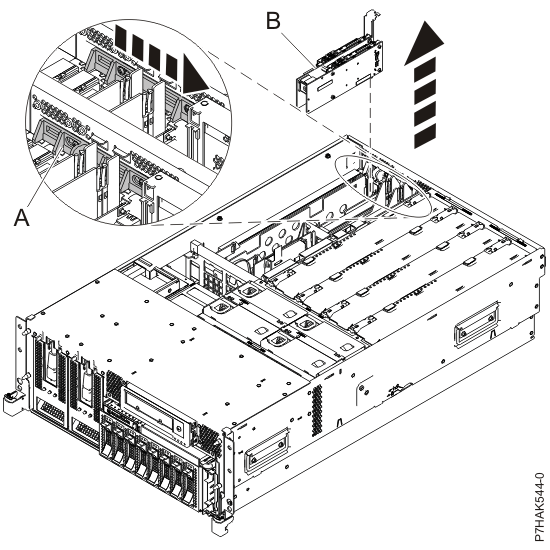
- Slide the adapter latch (A) into
the open position, as shown in the following figure. Figure 1. PCI RAID and SSD SAS adapter removed from the rack-mounted system unit