How To
Summary
The System Event Log contains errors and information about the managed system. The goal of this topic is to show how to collect the SEL using different types of Service Processors (DRAC 4 & 5; iDRAC 6; iDRAC 7; iDRAC8 and iDRAC9) on Dell PowerEdge Servers and Blades.
Steps
INDEX
Logging on to the DRAC or iDRAC.
- Login to the DRAC or iDRAC management network port using a web browser (https://1.1.2.3).
- Enter the Userid and Password. (Defaults are root / calvin).
DRAC 4 & 5 and iDRAC Blade M600
- Navigate to the “System” section and go to the “Logs” tab. Next click “System Event Log”.
- When the System Event Log appears, click “Save As”. Select “Save file” and click “OK" The SEL.log file will be saved into the path indicated.
iDRAC 6
Navigate to “System” and go to the “Logs” tab. Next click “System Event Log”.
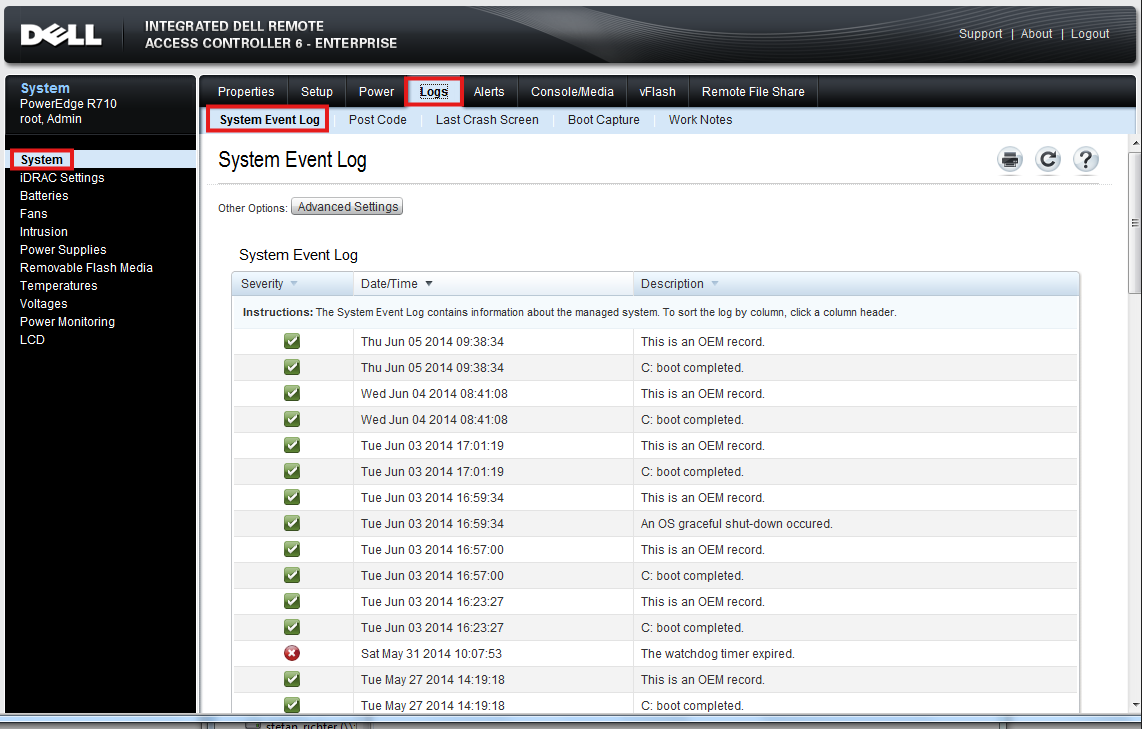
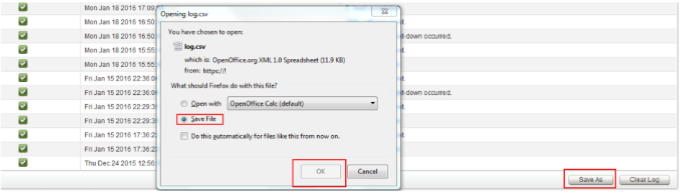
Scroll down and click the “Save As” button. In the pop up, click “Save file” and “OK “. The log.csv file will be saved into the path indicated.
iDRAC 7
On the left, navigate to “Server/Logs” and go to the “Logs" tab. Click “Logs“
Scroll down and click the “Save As” button. In the pop up select “Save file” then click “OK“. The
log.csv file will be saved into the path indicated.
log.csv file will be saved into the path indicated.
iDRAC 8
Navigate to Overview/Server/Logs and go to the “Logs” tab. Next click “System Event Log”.
Scroll down and click the “Save As” button. In the pop up window type the filename (or keep
the default) and click “Save”. The log file will be saved into the path indicated.
the default) and click “Save”. The log file will be saved into the path indicated.
iDRAC 9
Navigate to the “Maintenance” tab and select “System Event Log”.
Click the “download” button at the top right. In the pop up window type the filename (or keep
the default) and click “Save”. The log file will be saved into the path indicated.
the default) and click “Save”. The log file will be saved into the path indicated.
Document Location
Worldwide
[{"Line of Business":{"code":"LOB66","label":"Technology Lifecycle Services"},"Business Unit":{"code":"BU058","label":"IBM Infrastructure w\/TPS"},"Product":{"code":"SSFBM70","label":"MVS Server - Dell"},"ARM Category":[{"code":"a8m3p000000PCYrAAO","label":"MVS Server-\u003EDell x86-\u003EService Processors-\u003EDRAC IV"},{"code":"a8m3p000000PCZ4AAO","label":"MVS Server-\u003EDell x86-\u003EService Processors-\u003EiDRAC 5"},{"code":"a8m3p000000PCZ1AAO","label":"MVS Server-\u003EDell x86-\u003EService Processors-\u003EiDRAC 6 Enterprise"},{"code":"a8m3p000000PCYZAA4","label":"MVS Server-\u003EDell x86-\u003EService Processors-\u003EiDRAC 6 Express"},{"code":"a8m3p000000PCZ2AAO","label":"MVS Server-\u003EDell x86-\u003EService Processors-\u003EiDRAC 7"},{"code":"a8m3p000000PCZ3AAO","label":"MVS Server-\u003EDell x86-\u003EService Processors-\u003EiDRAC 8"},{"code":"a8m3p000000PCYoAAO","label":"MVS Server-\u003EDell x86-\u003EService Processors-\u003EiDRAC 9"}],"Platform":[{"code":"PF025","label":"Platform Independent"}],"Version":"All Versions","Type":"MASTER"}]
Was this topic helpful?
Document Information
Modified date:
05 November 2025
UID
ibm17181315