Product Documentation
Abstract
IBM Host On-Demand client can be run as applet (cached or download client) on a browser or as a WebStart client.
Oracle has announced that Java Applet and WebStart functionality, including the Applet API, The Java plug-in, the Java Applet Viewer, JNLP and Java Web Start (containing the javaws tool) are all deprecated in JDK 9 and will be removed in a future release.
Ref:
http://www.oracle.com/technetwork/java/javase/9-deprecated-features-3745636.html
Impact on Host On-Demand
Deprecation and subsequent removal of the WebStart functionality in Java 9 and future releases, would render the HOD applet and WebStart clients unusable.
Content
Problem Solution
Introducing HOD Launcher
IBM Host On-Demand now uses HOD Launcher to overcome this problem. HOD cached and download client pages will be launched as a HOD Launcher based on the browser’s java support.
When users access HOD web pages (both the default pages, and the pages created using HOD’s Deployment wizard) using browsers that do not support Java plug-in, the hodlauncher.msi file will be downloaded to the local system (Figure 1).

Figure 1. hodlauncher.msi downloaded for the first time
Users need to click on run to install the HOD Launcher. This is one-time activity. On subsequent launches, the HOD client is launched directly by the HOD Launcher.
User experience with HOD Launcher is like that of the Web Start client; all the configured sessions would remain the same. This is applicable for all types of configurations such as HTML-based, Configuration server-based and combined models. Apart from the default pages and pages created using Deployment wizard, this solution is applicable to HOD Administration clients, Database On-Demand clients and New User client pages.
The HOD Launcher is available in the versions of IBM Host On-Demand on and above v12.0.4.0 and v13.0.1.0.
After successful installation of HOD Launcher, a HOD web page looks like below (Figure 2).
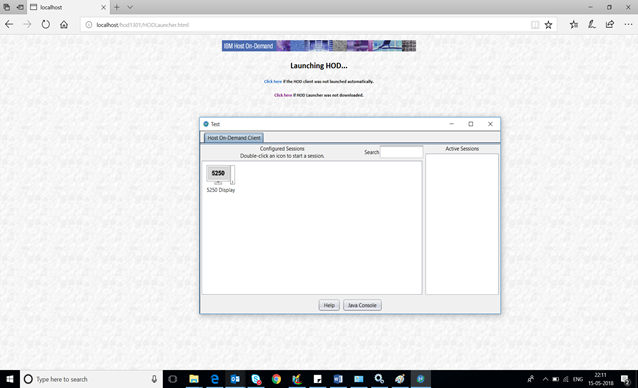
Figure 2. HOD Desktop started through the HOD Launcher.
How to Enable HOD Launcher:
By default, HOD Launcher is not enabled. To enable HOD Launcher follow the below steps:
- Go to the Host On-Demand publish directory.
e.g., C:\Program Files\IBM\HostOnDemand\HOD - Open the HODBaseDetect.js file presents inside the publish Directory.
- Search for isJNLPEnabled parameter. The default of the parameter is “true”. Change this to “false” and save the file.
e.g., isJNLPEnabled=false
Known Issues:
Issue: HodLauncher.msi installer package will get downloaded every time HTML pages are accessed through Microsoft Edge browser (based on Chromium open-source projects), when HOD Launcher is configured. This problem does not occur with other browsers, viz. FireFox, Chrome, etc.
Workaround: After accessing a HOD HTML page, click anywhere on the browser to set the focus. This enables the browser to detect the installed HODLauncher application.
Frequently Asked Questions:
- Why do I need HOD Launcher?
Oracle deprecating and removing applets and WebStart from Java 9 and above affects Host On-Demand as it uses JNLP to download the jars to the client machine. To address this problem, Host On-Demand has now come up with HOD Launcher. HOD Launcher application helps downloading the jar files and launch the client application, where applets and JNLP no longer work.
- I have not upgraded to Java-9 or latest Java, can I still use HOD launcher?
Yes, you can use HOD launcher with any version of Java supported by HOD clients.
- For which configuration model HOD Launcher will work with?
HOD Launcher will work for HTML based, Configuration Server Based and Combined models.
- Which client types are supported in HOD Launcher?
HOD Launcher will be used to launch Cached and Download client pages. - Do I need to restart Service Manager and Web Server after modifying HODBaseDetect.js?
No, restart is not required.
- How do I know if HOD Launcher is working?
When you launch HOD session in a browser after making changes to HODBaseDetect.js file, a file by name “hodlauncher.msi” will be downloaded (on a Windows client) or a link to download hodlauncher.msi appears in the bottom of the page. Once downloaded and installed, you will see an entry in “Installed Programs” in Control Panel as “IBM Host On Demand Launcher”. Now in the browser, your HOD should launch using the launcher.
- What if HOD Launcher does not get downloaded or download link does not appear?
Clear the browser cache.
- What are the things that get modified in my HOD sessions, settings, or in directory structure when we move from JNLP or browser plug-in to the HOD Launcher?
Nothing gets changed. It is just another way of downloading client jars to be able to run Host On-Demand.
- Are there any additional security considerations when one migrates to HOD Launcher?
No, there are no additional security considerations.
-
What is the installer type for non-windows clients?
.rpm for RHEL and .deb for Ubuntu - Can existing WebStart client pages created by HOD Deployment Wizard work with HOD Launcher?
Currently, HOD Launcher can launch only Cached and Download client pages.
Was this topic helpful?
Document Information
Modified date:
03 September 2020
UID
ibm10730757