Release Notes
Abstract
IBM Datacap is a complete solution for document and data capture. Datacap scans, classifies, recognizes, validates, verifies, and exports data and document images quickly, accurately and cost effectively.
Content
Known Issues, limitations, solutions
What's new in Datacap 9.1.5
What's new in Datacap 9.1.5 in IBM Knowledge Center
IBM Datacap Mobile app
The latest SDKs are always available on Fix Central .
Fix list
List of APARs created in previous releases ported into Datacap 9.1.5 release
| APAR # | ID | Component | Description |
| IO26523 | 184085 | Taskmaster Navigator | Users see the extend session pop up messages, when their session is about to expire in Datacap Navigator application. |
| IO26466 | 183935 | Rulerunner | The role-based batch filtering is not working for users, and instead that they see all the batche in Datacap Navigator. |
| IO26681 | 183828 | Taskmaster Navigator/TMWJ Client | WebScan and SpeedScan in Datacap Navigator application does not support all groups to edit scan settings. |
| IO26678 | 183778 | Recognition/Recog OCRS Scansoft | When using OCR/S in Rulerunner, sometimes the Action abort for an unknown reason. |
| IO26676 | 183610 | Taskmaster Navigator | Datacap Navigator allows for batch to be submitted while having required fields are left empty. |
| IO26646 | 183599 | Development Tools/Application Manager | Datacap Navigator Job Monitor fails to display batches, DcDesktop App fails to display batches in Job Monitor and Datacap Copy Tool fails to copy successfully when TLS v1.2 is enabled. |
| IO26450 | 183593 | Taskmaster Services | Datacap Navigator shortcuts is missing in subsequent applications when users log in to multiple applications. |
| IO26570 | 183592 | Taskmaster Services | Logging into Datacap applications login screen as “*” instead of a valid LDAP user name returns a list of all users in the domain. |
| IO26563 | 183540 | Desktop Clients/dcDesktop | The performance of loading entries required improvement in DcDesktop application Job Monitor. |
| IO26677 | 183530 | Actions/Validations | Under Validations action library, CalculateFields () action returns false when even the expression evaluates true. |
| IO26610 | 183423 | Development Tools/Application Wizard | Datacap Application wizard fails to create the DCO object in the new App even after configuring "Add Multiple" during App creation. |
| IO26590 | 183360 | Fingerprints (Service, DB, RRX) | autodoc.SetFingerprintSearchArea (0.6,) fails to limit the fingerprint matching to the first half of the page (0 to 50%). |
| IO26467 | 183327 | Desktop Clients/dcDesktop | Datacap Web Client Job Monitor privileges when unchecked or checked fails to work correctly for users in DcDesktop Application. |
| IO26573 | 183315 | Desktop Clients/dcDesktop | DCDesktop does not display image and field data if page ID does not match field or image name. |
| IO26363 | 183312 | Desktop Clients/dcDesktop | Datacap Desktop - In Fixup if you drag and drop an image from one document to another document the focus of the resulting change is lost. |
| IO26679 | 183276 | Taskmaster Navigator/TMWJ Client | When trying to launch any of the clients - Scan, Classify, Verify in the Datacap Navigator's Dual Viewer's Separate Window if it is accidentally closed before it is fully loaded it hangs when trying to open. |
| IO26607 | 183227 | Actions/Document Analytics/Text Extraction/System T | DocumentAnalytics - SystemT Proxy returns null in case of span field which results in to no output from SystemT. |
| IO26567 | 183224 | wTM | In Datacap Navigator date formats are incorrectly displayed when using German locale. |
| IO26329 | 183172 | Taskmaster Navigator | In Datacap Navigator application, the dual window is not in the imported images after user clicks any rotation button on the Actions drop-down list. |
| IO26439 | 183171 | Taskmaster Navigator/TMWJ Client | Comments are overlapped on thumbnails and blocking the selection of thumbnails on Datacap Navigator. |
| IO26574 | 183165 | Desktop Clients/dcDesktop | Image data file in batch folder is automatically deleted when the page is rotated during Fixup Task in Datacap Desktop. |
| IO26550 | 183093 | Taskmaster Navigator | In Datacap Navigator Application, the currency data is not shown correctly in the verify page. |
| IO26429 | 182942 | Taskmaster Navigator/TMWJ Client | In Datacap Navigator application, users are unable to save field data when editor type is "Editable entry list". |
| IO26370 | 182941 | Taskmaster Navigator/TMWJ Client | In Datacap Navigator application, running a second scan on the same batch and selecting insert or append loads the first scanner driver on the list. |
| IO26526 | 182915 | Taskmaster Services | TMS Crashing due to memory leak and forcing Datacap applications to become unresponsive. |
| IO26541 | 182892 | Taskmaster Navigator | In Datacap Navigator application unable to rezone field in the mail page after splitting documents in Datacap Navigator Verify |
| IO26524 | 182869 | Taskmaster Navigator | Validation error is displayed when using a custom verification panel in Datacap Navigator. |
| IO26525 | 182850 | Taskmaster Navigator | Datacap Navigator application fails to return the right value correctly when using auto complete to fill in the desired page type. |
| IO26435 | 182748 | Taskmaster Navigator | Datacap Navigator application fails to display task lists when users lack Job Monitor privileges and additional permissions on tasks that are available with multiple programs. |
| IO26434 | 182746 | Taskmaster Navigator | In Datacap Navigator when auto launch next batch and auto submit the batch is enabled in Verify user settings there is an attempt to unnecessarily reload both current page and then reload the page of the next batch. |
| IO26465 | 182744 | Taskmaster Navigator | Field position is not correct if the user tries to drag a box outside the image boundary in Datacap Navigator application. |
| IO26516 | 182737 | Taskmaster Navigator/TMWJ Client | No support to detect paper size automatically when scanning with Datacap Navigator. |
| IO26520 | 182734 | Taskmaster Navigator/TMWJ Client | In Datacap Navigator when the scanner runs out of paper in the feeder, it fails to switching scanning documents from scanners that are not equipped with sensors. |
| IO26523 | 182574 | Taskmaster Navigator | Users see the extend session pop up messages when their session is about to expire in Datacap Navigator application. |
| IO26447 | 182558 | Taskmaster Navigator | The start panel field is not updated when auto launching next pending classify batch in Datacap Navigator. |
| IO26428 | 182237 | Actions/Color2BW, Grayscale, ImageConvert | RescaleImage in ImageConvert does not create safely, a backup file which may cause a file IO error at runtime. |
| IO26431 | 182236 | Taskmaster Navigator/TMWJ Client | Physical scanning takes longer time when attempting to scan batches of 300+ pages with Daeja Pro viewer in Datacap Navigator. |
| IO26422 | 182131 | Recognition/Recog OCRA | Recognition using OCR/A gets slower as more Rulerunner processes are configured to use recognition actions. |
| IO26432 | 182092 | Taskmaster Navigator/TMWJ Client | Extend "Return to Pending" button to be supported in Scan, Classify and Verify client. |
| IO26328 | 181419 | Taskmaster Navigator/TMWJ Client | Users are unable to fetch batch level fields value in PostScanProfile rules at Scan task. |
| IO26212 | 180380 | Taskmaster Navigator | Color Scanning within Datacap Navigator creates big size images when scanning in the images through a physical scanner. |
Known issues, limitations, solutions
Known issues in Datacap 9.1.5 Build 244:
1. "Datacap Web Server Configuration Tool" still checks for ASP.NET 3.5 (Not Required) and does not load without ASP.NET 3.5 installed.

Workaround: Do one of the following:
Workaround 1: Install ASP.NET 3.5, then use this tool to configure tmweb.net on IIS, then uninstall ASP.NET 3.5 afterward.
Workaround 2: Manually configure tmweb.net from "Internet Information Services (IIS) Manager" without ASP.NET 3.5 installed.
2. "IBM Datacap Local Service" installer still checks for .NET 3.5.1 (Not Required) and does not allow installer to run.
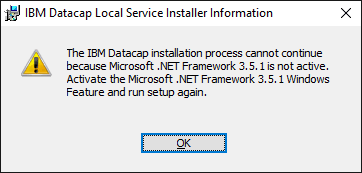
Workaround: Do one of the following:
Workaround 1: Install .NET 3.5.1, then run setup to install Local Service, then uninstall .NET 3.5.1 afterward.
Workaround 2: Run installer with switch to bypass .NET 3.5.1 check, run setup.exe /V"DOTNETVERSION35SP1=1"
Other issues:
Image displaying issue with Daeja virtual viewer: Some scanned JPEG images are not displayed correctly in Datacap Navigator with Daeja virtual viewer, because the problem is related to scanner hard driver.
DcDesktop application unavailable: Creation of custom start batch panel functionality in DcDesktop application is no longer available in 9.x even though the class exists in the DcDesktop custom panels SDK.
Was this topic helpful?
Document Information
Modified date:
08 September 2020
UID
ibm10740437