Technical Blog Post
Abstract
A Deep Learning Demo Using nvidia-docker: Dog Breed Classification wifh caffe
Body
 In my previous blog post, I walked through how to use nvidia-docker to isolate GPUs inside docker containers. Since that post, I've added a new caffe-nv image build for POWER to the nvidia-docker project, and would like to share a fun demo you can easily deploy yourself. This demo builds a web app* that analyzes a picture of a dog, and using a trained model, identifies the dog breed. The app makes use of the caffe-nv deep learning framework, which is NVIDIA's supported fork of the BVLC caffe project.
Make sure you've read my first nvidia-docker post: nvidia-docker on POWER: GPUs Inside Docker Containers. That post will walk you through the pre-reqs of installing nividia-docker and cloning the nvidia-docker repository. The rest of this post assumes you have nvidia-docker installed.
If you walked through the steps to build the CUDA images in the previous blog post, this demo will build a little more quickly. If you didn't, the CUDA image builds are all auto-built by the nvidia-docker project, so no need to go back and complete those steps.
This demo consists of two building blocks: The docker image for caffe, and the docker image for the pet breeds app itself. If you're not familiar with how docker images work, 99% of the time†, one image builds from another (often called a base) image. IOW, they're stacked on top of each other. This demo stacks the pet breeds classification app code on top of the caffe code. The docker filesystem drivers (aka Graph Drivers) present these "stacks" as a single filesystem to the running application.
Building the caffe image
The caffe docker image is built when you run the appropriate make command from the nvidia-docker project. This first step is going to take a while, since you're building the caffe image (and its requisite images) yourself. None of these images for POWER are hosted on Docker Hub just yet. If they were, this would take only as much time as building the app image. So, you might want to kick this part off during a conference call or before you head to lunch.
$ git clone --branch ppc64le https://github.com/NVIDIA/nvidia-docker.git && cd nvidia-docker
$ OS=ubuntu-16.04 make caffe
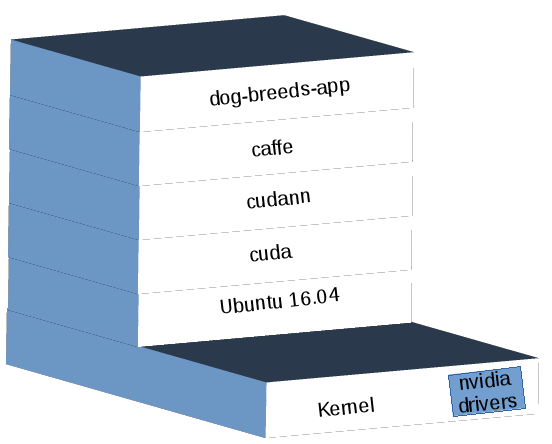
If you do stick around to watch this (or pipe the output to a log file ) you'll see multiple images being built. The caffe image builds on top of a cudann5 image, which builds on top of a cuda 8.0 image, which builds on top of an Ubuntu 16.04 image that docker pulls from Docker Hub! All those builds are run by the nividia-docker project's Makefiles.
Building the app image
I've slightly modified the Dockerfile from the nimbix project to work with nvidia-docker to build (into a docker image) the pet breeds classification demo. Use the following commands to build the dog-breeds-app image:
$ git clone https://github.com/clnperez/app-pet-breed-demo.git && cd app-pet-breed-demo
$ docker build -t dog-breeds-app .
Running the app container
The internals of the app are well explained in the README of the project*. In short, it creates a model from a Stanford dataset of dog breeds that has been pulled into the app, and the container will run a small web server that binds to port 5000 on your system allowing you to connect to it. From the web app, you can then input a URL to an image of dog, and the app will tell you the dog breed the model has deduced from the image. It will list the top results and weights for each.
$ nvidia-docker run -d -p 5000:5000 -name dog-breeds-container dog-breeds-app launch.sh
This command creates and runs a new docker container that executes the web app. You can now connect to it using the hostname or IP of your server, e.g. http://myhostname:5000. From there, you should see a webpage with an input box. Find a picture of a dog online, and paste the URL of the image. Here's one of an English Wire-Haired Terrier for you to try: https://upload.wikimedia.org/wikipedia/commons/thumb/b/b7/Elias1%C4%8Derven2006.jpg/220px-Elias1%C4%8Derven2006.jpg.
If you want to see all the training that happened to create the model, execute the following command:
$ docker logs dog-breeds-container | less
Summary
This is a very short example to illustrate what caffe can do, and runs the result in a container. If you want to try other things, you can use the base caffe image to create your own models. The training can be done inside of the container, since your GPU is accessible inside of it. Just make sure you run the container using nvidia-docker so that the nvidia drivers and the GPU are both added to the container.
Enjoy!
* The app, hosted here, was created by Wang Jun Song, a member of the IBM Research team in China.
† As an advanced docker topic, you can read about using the 'scratch' keyword to build images from, instead of using base images.
‡
UID
ibm16170013