Question & Answer
Question
How do you audit the use of the commands that perform Job Queue operations on the System.
Answer
By turning on Object Auditing on the Job Queue commands, we can track who is using them to perform operations on Job Queues.
Before you start, verify that the QAUDJRN exist and that you are tracking of object usage operations.
Use the DSPSECAUD command and make sure the following settings are configured on your system:
  Security journal QAUDJRN exists . . . . . :   YES
Current QAUDCTL system value  . . . . . . :  *OBJAUD
If not there, use the CHGSECAUD command to add them to your system.
Step 1.
Turn on object auditing on the commands that are used to perform actions on the Job Queue:
  CHGOBJAUD OBJ(CHGJOBQ) OBJTYPE(*CMD) OBJAUD(*ALL)
CHGOBJAUD OBJ(CLRJOBQ) OBJTYPE(*CMD) OBJAUD(*ALL)
CHGOBJAUD OBJ(CRTJOBQ) OBJTYPE(*CMD) OBJAUD(*ALL)
CHGOBJAUD OBJ(DLTJOBQ) OBJTYPE(*CMD) OBJAUD(*ALL)
CHGOBJAUD OBJ(HLDJOBQ) OBJTYPE(*CMD) OBJAUD(*ALL)
CHGOBJAUD OBJ(RLSJOBQ) OBJTYPE(*CMD) OBJAUD(*ALL)
Step 2
Using the SQL DISPLAY_JOURNAL table function you can create a report for Job Queue operations.
Authorization:
- You must have *USE authority to the journal and to all requested journal receivers.
- *OBJEXIST authority is required to the journal if object-name is omitted or if object-name specifies an object that no longer exists.
- If object-name is *ALL, you must be authorized to every object associated with a journal entry.
Using the RUN SQL Scripts tool, run the following SQL Statement:
SELECT object AS command,
       Job_name,
       job_user,
       job_number,
       entry_timestamp,
       SUBSTR(CAST(entry_data AS CHAR(2048)), 31, 1000) AS command_string
    FROM TABLE (
            QSYS2.DISPLAY_JOURNAL(
                JOURNAL_LIBRARY => 'QSYS',
                JOURNAL_NAME => 'QAUDJRN',
                STARTING_RECEIVER_NAME => '*CURCHAIN', JOURNAL_ENTRY_TYPES => 'CD',
                STARTING_TIMESTAMP => '2021-04-29 07:00:00', ENDING_TIMESTAMP => '2021-04-29 07:40:00')
        )
    WHERE object LIKE '%JOBQ%'
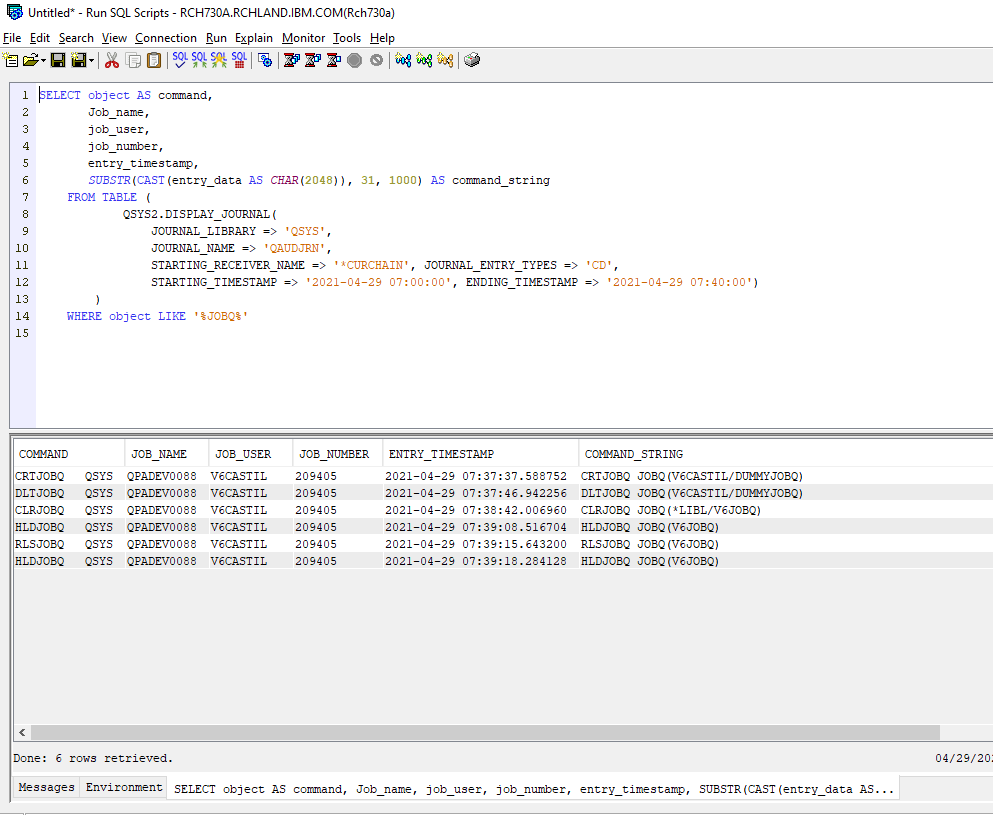
Note 1: Modify the time and date on the SQL to the wanted one.
Note 2: If Hexadecimal data is displayed on the report, you need to change the JDBC connection properties to translate the CCSID to 65535. On the Run SQL tool, select the Connection Menu > JDBC Connection > Edit > Translation and click on Translate CCSID 65535. Save the connection and reconnect to run the SQL.
To create a report of JOBQ activity auditing the JOBQ Object, refer to the following link: Auditing Job Queue Operations using the CHGOBJAUD on the JOBQ Object
[{"Type":"MASTER","Line of Business":{"code":"LOB68","label":"Power HW"},"Business Unit":{"code":"BU070","label":"IBM Infrastructure"},"Product":{"code":"SWG60","label":"IBM i"},"ARM Category":[{"code":"a8m0z0000000CHyAAM","label":"Security"}],"ARM Case Number":"TS005531406","Platform":[{"code":"PF012","label":"IBM i"}],"Version":"7.2.0;7.3.0;7.4.0;7.5.0"}]
Was this topic helpful?
Document Information
Modified date:
02 April 2024
UID
ibm16448466