Task thresholds
- 60%, 70%, 80%, 90%, and 100% when the
Goes Higher Than
operator is used. - 50%, 60%, 70%, 80%, and 90% when the
Goes Lower Than
operator is used.
- A threshold to indicate how close the system is to the MXT value. You can define more than one event to indicate various degrees of health as the threshold gets closer to the limit you set for the MXT system initialization parameter.
- A TRANCLASS resource and a threshold to indicate how close the TRANCLASS resource is to its MAXACTIVE value. You can define more than one event to indicate various degrees of health as the number of attached tasks gets closer to the MAXACTIVE limit you set for the TRANCLASS resource.
To avoid large numbers of events being emitted, events are emitted
only when the number of active tasks crosses a new threshold boundary.
For example, events are emitted during transaction attach when the
number of active tasks exceeds a threshold and the previous goes
higher than
event was when the next lowest threshold was crossed.
Events are emitted during transaction detach when the number of active
tasks falls below a threshold and previously goes lower than
event
was when the next highest threshold was crossed. Figure 1 shows
such examples.
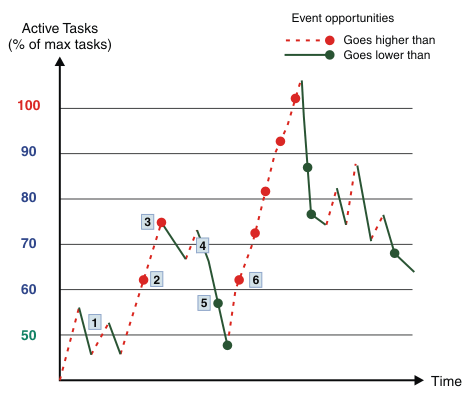
1 No events are emitted when the number
of active tasks exceeds the 50% threshold. Events are emitted during
transaction attach only when the number of active tasks crosses one
of the 60%, 70%, 80%, 90%, or 100% thresholds. No events are emitted
when the number of active tasks falls below the 50% threshold, because
the number of active tasks has not been above the 60% threshold since
the last goes below 50%
event.
2 An event is emitted because the
number of active tasks exceeds the 60% threshold for the first time
since the previous goes above 50%
event.
3 An event is emitted because the
number of active tasks exceeds the 70% threshold for the first time
since the previous goes above 60%
event.
4 No events are emitted when the number of active tasks oscillates around the 70% threshold because the number of active tasks does not cross a threshold boundary to either exceed the 80% threshold or drop below the 60% threshold.
5 An event is emitted because the
number of active tasks drops below the 60% threshold for the first
time since the previous goes below 70%
event.
6 A series of events are emitted when the number of active tasks progressively exceeds the 60%, 70%, 80%, 90%, and 100% thresholds.
Considerations
Event emission is not enabled for a TRANCLASS when its MAXACTIVE value is set to less than 10.
TRANCLASS threshold events are not emitted for those transactions defined as not having a TRANCLASS, that is, those defined with TRANCLASS(DFHTCL00).
- For the system 100% threshold, ensure that the EP adapter will be linked to. It is possible that an attached EP adapter task would be queued until the MAXTASK condition is cleared.
- For the TRANCLASS 100% threshold, ensure that the TRANCLASS that causes the event is not used for the EP adapter.