Subscribe to this information
POWER7 information
Installing a PCI adapter contained in a cassette with the power on in the IBM i environment
You can install a PCI adapter with the power on in the IBM® i environment.
If you are installing a new feature, ensure that
you have the software that is required to support the new feature
and that you determine whether there are any prerequisites. To check for the prerequisites, see IBM Prerequisite
website . If the required software is not installed, see
the following websites to download it, and then install it before
continuing:
- To download firmware and software updates and fixes, see the Fix Central.
- To download Hardware Management Console (HMC) updates and fixes, see Hardware Management Console Support and downloads.
Notes:
- If the system is partitioned, you must determine the partition owning the I/O slot. Once the adapter is installed, the I/O slot must be powered on in the operating system.
- If an I/O slot on a partitioned system is not owned by a partition, then the I/O slot cannot be powered on.
- Adding an I/O slot to a partition using Dynamic Logical Partitioning (DLPAR) will power on the I/O slot as part of the DLPAR add. For information about DLPAR, see Dynamic Logical Partitioning.
- To learn more about working in a partitioned environment, see Logical partitioning.
Important:
- If you are removing, installing or
replacing a PCI-X double-wide, quad-channel Ultra320 SCSI RAID controller,
note the following concurrent maintenance information before proceeding
with the instructions provided here. Concurrent maintenance of this
double-wide adapter is not supported through the HMC. Concurrent maintenance
must be done from within the partition operating system. In IBM i,
the Hardware Service Manager (HSM) of the system or owning partition
will automatically power off or on both PCI slots when either slot
is selected. In AIX® or Linux, you must manually
power off and on each slot separately.Note:
- Both PCI slots must be powered off when installing or removing this adapter with the system power on.
- If this adapter is the load source IOA, or any other storage IOA with critical storage devices attached to the system, this concurrent maintenance procedure should be performed by a qualified service provider.
- Fibre Channel Adapters (5735 or 5774) installed in IBM i OS logical partitions will post errors at initial program load (IPL) if there is no device or wrap plug attached to each of the adapter's ports. Make sure that every Fibre Channel Adapter (5735 or 5774) that is installed in IBM i OS logical partition has either a wrap plug or a device attached to each of the adapter's ports. If you are exchanging a 5735 or 5774 Fibre Channel IOA, the external storage subsystem must be updated to use the worldwide port name of the new 5735 or 5774 IOA. For instructions, see Updating the worldwide port name for a new 5735 or 5774 IOA.
- If you are replacing a 2748, 2757, 2763, 2767, 2778, 2780, 2782, 5702, 5709, or 570B storage IOA, take note of the following: Depending on the configuration of the system, the storage IOA cache might have been disabled to allow the attachment of OEM storage that emulates a load source drive. If you are replacing a storage IOA that has its cache disabled, configure the replacement IOA the same way as the IOA that you removed. If you remove hardware from the replacement IOA, return that hardware with the failed IOA.
If you do not have an HMC, complete the following steps to install a PCI adapter with the system power on in the IBM i environment:
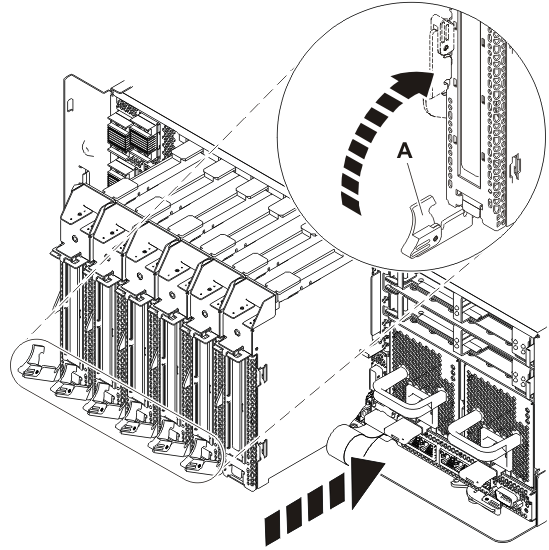
- Remove the cassette. Press downward on the lower cassette
handle (A) as shown in the following figure. Pull the PCI cassette
out of the system. Figure 1. Removing the PCI adapter cassette from the system
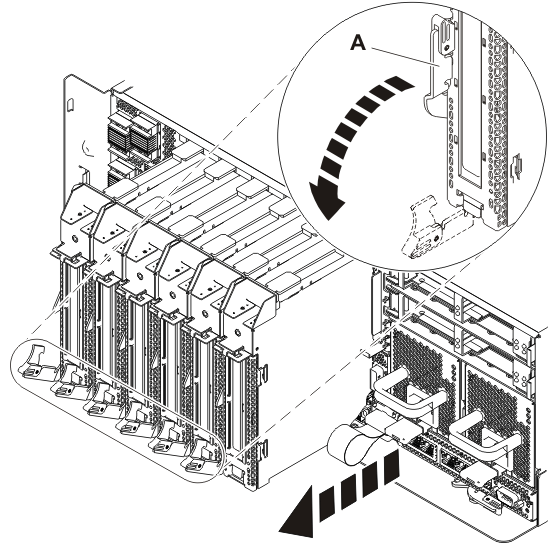
- When the cassette is fully inserted into the system, firmly
press cassette handle (A) to lock the adapter
in its connector. Figure 2. Installing the PCI adapter cassette in the system