Removing the time-of-day battery from the 5105-22E, 9008-22L, 9009-22A, 9009-22G, 9223-22H, or 9223-22S system
To remove the time-of-day battery, complete the steps in this procedure.
Procedure
-
Grasp the time-of-day battery and pull it out of its slot in location P1-C1-E1 on the service processor card as
shown in Figure 1.
Attention: While removing the battery, do not use a metallic tool to disengage it from its slot.CAUTION:
- After removing the failed time-of-day battery, do not:
- Burn or charge the battery (to avoid possible explosion as the battery contains lithium).
- Throw or immerse the battery in water.
- Heat the battery to more than 100 ⁰C (212 ⁰F).
- Repair or disassemble the battery.
- Exchange the battery only with the IBM-approved part. Recycle or discard the battery as instructed by local regulations. In the United States, IBM® has a process for the collection of this battery. For information, call 1-800-426-4333. Have the IBM part number for the battery unit available when you call.
When you remove the time-of-day battery, ensure that you also did not loosen the service processor card. Press the service processor card in to be sure that it is not loose.Figure 1. Removing the time-of-day battery 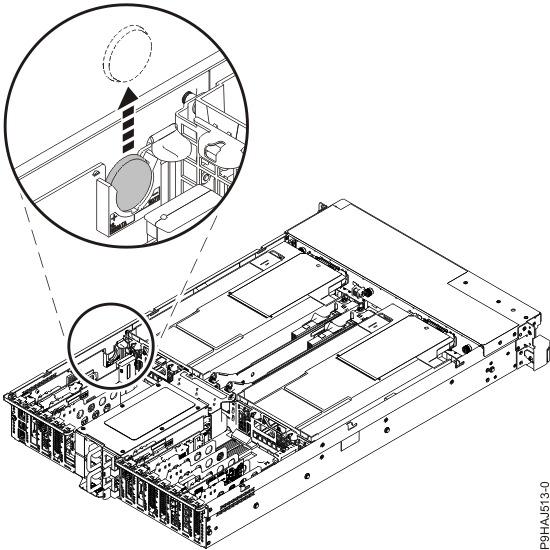
- After removing the failed time-of-day battery, do not: