Tracing distributed events
A number of IFCIDs, including IFCID 1 (statistics) and IFCID 3 (accounting), record distributed data and events.

If your applications update data at other sites, turn on the statistics class 4 trace and always keep it active. This statistics trace covers error situations surrounding in doubt threads; it provides a history of events that might impact data availability and data consistency.
Db2 accounting records are created separately at the requester and each server. Events are recorded in the accounting record at the location where they occur. When a thread becomes active, the accounting fields are reset. Later, when the thread becomes inactive or is terminated, the accounting record is created.
The following figure shows the relationship of the accounting class 1 and 2 times and the requester and server accounting records.
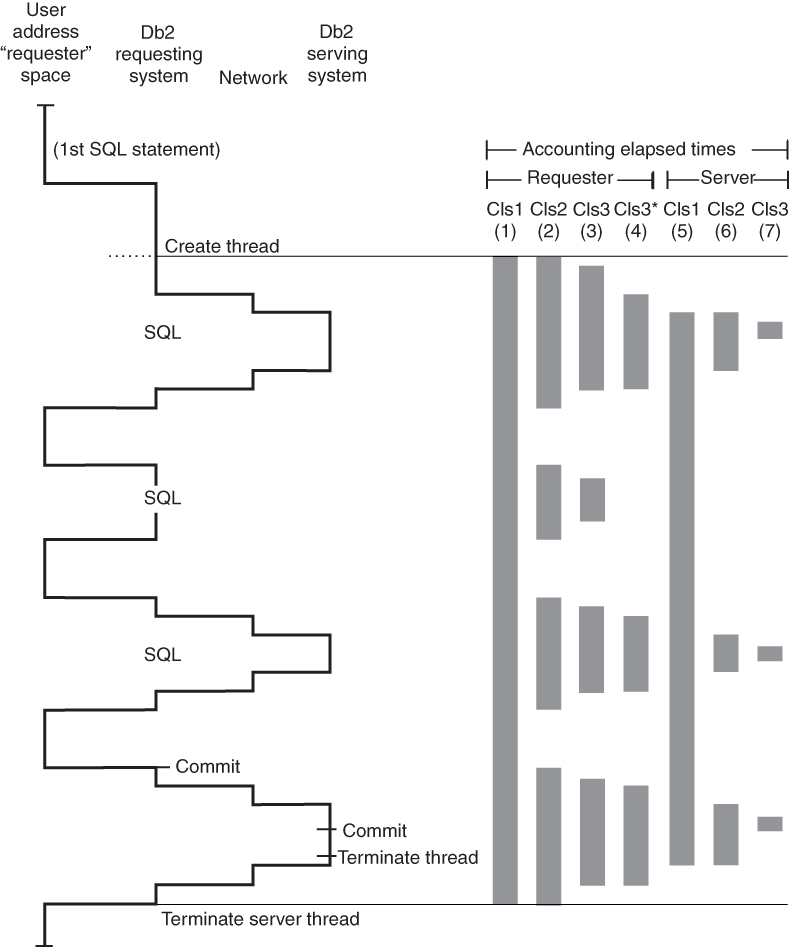
This figure is a simplified picture of the processes that go on in the serving system. It does not show block fetch statements and is only applicable to a single row retrieval.
- (1) - Requester Cls1
This time is reported in the ELAPSED TIME field under the APPL (CLASS 1) column near the top of the IBM® OMEGAMON® for Db2 Performance Expert on z/OS® accounting long trace for the requesting Db2 subsystem. It represents the elapsed time from the creation of the allied distributed thread until the termination of the allied distributed thread.
- (2) - Requester Cls2
This time is reported in the ELAPSED TIME field under the Db2 (CLASS 2) column near the top of the IBM OMEGAMON for Db2 Performance Expert on z/OS accounting long trace for the requesting Db2 subsystem. It represents the elapsed time from when the application passed the SQL statements to the local Db2 system until return. This is considered
In Db2
time. - (3) - Requester Cls3
This time is reported in the TOTAL CLASS 3 field under the CLASS 3 SUSP column near the top of the IBM OMEGAMON for Db2 Performance Expert on z/OS accounting long trace for the requesting Db2 system. It represents the amount of time the requesting Db2 system spent suspended waiting for locks or I/O.
- (4) - Requester Cls3* (Requester wait time for activities not
in Db2)
This time is reported in the SERVICE TASK SWITCH, OTHER SERVICE field of the IBM OMEGAMON for Db2 Performance Expert on z/OS accounting report for the requesting Db2 subsystem. It is typically time spent waiting for the network and server to process the request.
- (5) - Server Cls1
This time is reported in the ELAPSED TIME field under the APPL (CLASS 1) column near the top of the IBM OMEGAMON for Db2 Performance Expert on z/OS accounting long trace for the serving Db2 subsystem. It represents the elapsed time from the creation of the database access thread until the termination of the database access thread.
- (6) - Server Cls2
This time is reported in the ELAPSED TIME field under the Db2 (CLASS 2) column near the top of the IBM OMEGAMON for Db2 Performance Expert on z/OS accounting long trace of the serving Db2 subsystem. It represents the elapsed time to process the SQL statements and the commit at the server.
- (7) - Server Cls3
This time is reported in the TOTAL CLASS 3 field under the CLASS 3 SUSP column near the top of the IBM OMEGAMON for Db2 Performance Expert on z/OS accounting long trace for the serving Db2 subsystem. It represents the amount of time the serving Db2 system spent suspended waiting for locks or I/O.
The Class 2 processing time (the TCB time) at the requester does not include processing time at the server. To determine the total Class 2 processing time, add the Class 2 time at the requester to the Class 2 time at the server.
Likewise, add the getpage counts, prefetch counts, locking counts,
and I/O counts of the requester to the equivalent counts at the server. For DRDA, SQL
activity is counted only at the server.