HA asymmetric access optimization
HA access characteristics can balance the controller workload.
By default, the primary adapter is optimized for all RAID arrays. The secondary adapter is non-optimized for all RAID arrays. The workload is not balanced between the two controllers. With either of the HA RAID configurations, maximum performance might be achieved by defining HA asymmetric access state for each disk array such that the workload is balanced between the two controllers. Setting the HA asymmetric access state for a disk array specifies which controller is preferred to be optimized for the disk array and perform direct reads and writes to the physical devices.
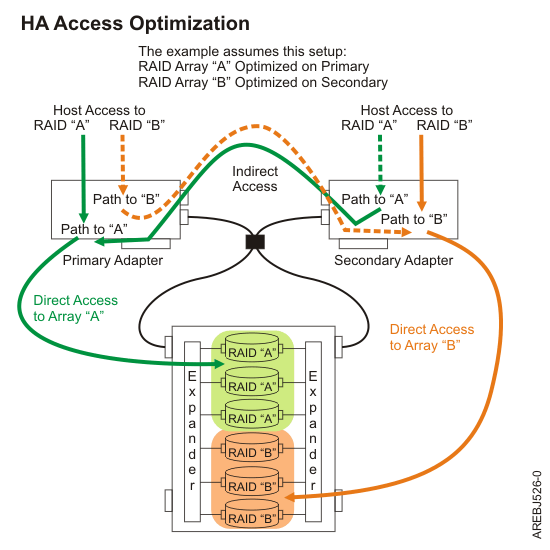
Once the HA asymmetric access is enabled, HA asymmetric access states are displayed on the Array Asymmetric Access screen under the menu option titled Work with Disk Arrays, similar to the following screen; note that the status column shows the primary adapter view of the HA asymmetric access states of RAID arrays in HA single system RAID configuration:
+------------------------------------------------------------------------------+

|                             Array Asymmetric Access                          |

|                                                                              |

|Select the disk array path.                                                   |

|Type choice, press Enter.                                                     |

|  1=change asymmetric access for a disk array                                 |

|OPT Name   PCI/SCSI Location          Description               Status        |

|--- ------ -------------------------- ------------------------- --------------|

|    sdd    0002:00:01.0/1:255:0:0     RAID 5 Disk Array         Active        |

|    sde    0002:00:01.0/1:255:1:0     RAID 10 Disk Array        Optimized     |

|    sdh    0002:00:01.0/1:255:2:0     RAID 0 Disk Array         Optimized     |

|e=Exit   q=Cancel   r=Refresh   t=Toggle                                      |

+------------------------------------------------------------------------------+
By using the up/down arrow keys to move the cursor to the desired RAID array, you can select it by pressing 1 followed by Enter. The HA asymmetric access state of the selected RAID array is displayed on the Change Asymmetric Access Configuration of Array screen, similar to the following:
+------------------------------------------------------------------------------+

|                 Change Asymmetric Access Configuration of Array              |

|                                                                              |

|Current array asymmetric access configuration is shown. To change setting hit |

|'c' for options menu. Highlight desired option then hit Enter.                |

|  c=Change Setting                                                            |

|Array: /dev/sdh                                                               |

|Current asymmetric access state: Optimized                                    |

|Saved asymmetric access state: Not Set                                        |

|Preferred Asymmetric Access State. . . . : Not Set                            |

|Or leave blank and press Enter to cancel                                      |

|e=Exit   q=Cancel                                                             |

+------------------------------------------------------------------------------+
This display shows the HA asymmetric access state for the disk arrays selected. For each disk array listed, the current and preferred HA asymmetric access states are indicated. The current value shows how the disk array is currently accessed from the controller that was selected. The preferred value is the desired access state that is saved with the disk array configuration. Selecting the remote controller would show the opposite settings for the current and preferred access states.
There are three possible access state settings used for the HA asymmetric access state:
- Optimized
- The selected controller performs direct access for this disk array. This gives I/O operations performed on selected controller optimized performance compared to the remote controller. The selected disk array will be set to Non-Optimized on the remote adapter.
- Non-Optimized
- The selected controller performs indirect access for this disk array. This gives I/O operations performed on selected controller non-optimized performance compared to the remote controller. The selected disk array will be set to Optimized on the remote adapter.
- Not Set
- Neither an Optimized nor Non-Optimized access state has been set for this disk array. By default the disk array will be optimized on the primary controller.
The HA asymmetric access state can only be displayed and modified from the primary controller. The Preferred Asymmetric Access state can be modified when the disk array is selected from the primary controller. Changing the Preferred Asymmetric Access state from the primary controller stores the settings in the disk array and will automatically set the opposite settings on the secondary controller.
The controller will always try to switch the Current Asymmetric Access state of the disk array to match the Preferred Asymmetric Access state. This switching is done in the background by the controller; therefore, there may be delays between setting the Preferred Asymmetric Access state and seeing Current Asymmetric Access state switch. There are also situations where the controller will not switch HA asymmetric access state due to scenarios involving configuration errors, failed components, and certain RAID configuration activities.
By default all disk arrays are created with a Preferred Asymmetric Access state of Not Set. In order to maximize performance it is recommended that, when appropriate, multiple disk arrays be created and optimized equally between the controller pair. This is accomplished by setting the Preferred Asymmetric Access to Optimized for half of the disk arrays and Non-Optimized to the other half.
