Understanding recovery logs
All databases have logs associated with them. These logs keep records of database changes. If a database needs to be restored to a point beyond the last full, offline backup, logs are required to roll the data forward to the point of failure.
There are two types of Db2® logging: circular and archive. Each type of logging provides a different level of recovery capability:
- Circular logging
Circular logging is the default behavior when a new database is created (the logarchmeth1 and logarchmeth2 database configuration parameters are set to OFF). With this type of logging, only full, offline backups of the database are allowed. The database must be offline (inaccessible to users) when a full backup is taken. As the name suggests, circular logging uses a "ring" of online logs to provide recovery from transaction failures and system crashes. The logs are used and retained only to the point of ensuring the integrity of current transactions. Circular logging does not allow you to roll a database forward through transactions performed after the last full backup operation. All changes occurring since the last backup operation are lost. Since this type of restore operation recovers your data to the specific point-in-time at which a full backup was taken, it is called version recovery.
Figure 1. Circular Logging shows that the active log uses a ring of log files when circular logging is active 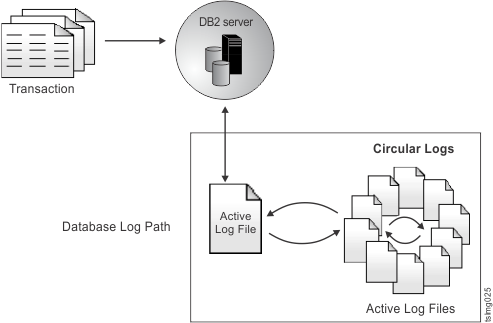
Figure 2. Rollforward recovery 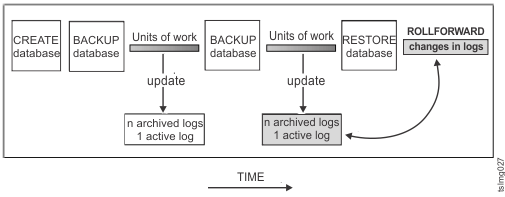
Active logs are used during crash recovery to prevent a failure (system power or application error) from leaving a database in an inconsistent state. Active logs are located in the database log path directory.
- Archive logging
Archive logging is used specifically for rollforward recovery. Archived logs are logs that were active but are no longer required for crash recovery. Circular logging is the default setting of Db2 for TSLM. To change to archive logging, you can set the logarchmeth1 database configuration parameter, or run the script
tslmsetlogarchive.sh.
The advantage of choosing archive logging is that rollforward recovery can use both archived logs and active logs to rebuild a database either to the end of the logs, or to a specific point-in-time. The archived log files can be used to recover changes made after the backup was taken. This is different from circular logging where you can only recover to the time of the backup, and all changes made after that are lost.
Taking online backups is only supported when the database is configured for archive logging. During an online backup operation, all activities against the database are logged. When an online backup image is restored, the logs must be rolled forward at least to the point-in-time at which the backup operation completed. For this to happen, the logs must have been archived and made available when the database is restored. After an online backup is complete, Db2 forces the currently active log to be closed, and as a result, it will be archived. This ensures that your online backup has a complete set of archived logs available for recovery.
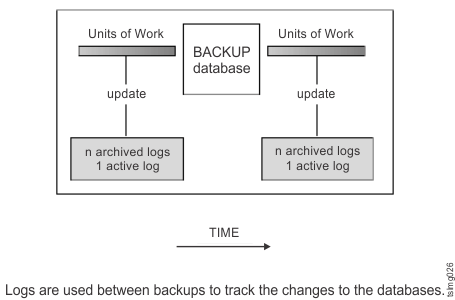
Use these database configuration parameters to change where archived logs are stored: the newlogpath parameter, and the logarchmeth1 and logarchmeth2 parameters. Changing the newlogpath parameter also affects where active logs are stored.
To determine which log extents in the database log path directory
are archived logs, check the value of the loghead database configuration
parameter. This parameter indicates the lowest numbered log that is
active. Those logs with sequence numbers less than loghead are archived
logs and can be moved. You can check the value of this parameter by
using IBM®
Db2 Control Center tools,
or by using the command-line processor and the GET DATABASE CONFIGURATION command
to view the First active log file. For more information
about this configuration parameter, refer to the publication Db2 Administration
Guide: Performance.
For a complete overview about the different methods, refer to the Db2 publication Data Recovery and High Availability Guide and Reference, SC27-2441-02.