History view
This view displays the history information that was recorded for this particular message throughout the workflow. Special permission is required to see the history list.
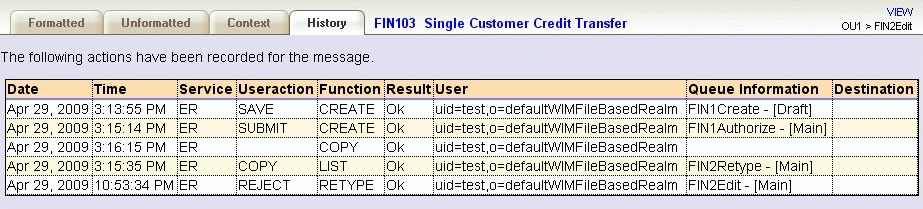
The history view contains the following information:
- Date and Time
- The date and time (in UTC) of the history entry.
- Service
- This field contains the service identification of the function that operated on the message. For example, this field contains the value "ER" for MER functions and "ROUTING" for routing operations that happened during processing of the message.
- Useraction
- If an MER user action was taken, this field contains the action that was triggered by the user (for example "SAVE").
- Function
- This field indicates which function (for example, CREATE, RETYPE, or AUTHORIZE) processed the message. The value LIST indicates that the user action was submitted from the message list.
- Result
- This field describes the result (Ok or Failed) of the function that processed the message.
- User
- This field identifies the user who performed the function. The user information for MER functions represents the user unique name.
- Queue information
- This field contains the name and queue type of the target queue after the action was performed.
- Destination
- This field is set by routing and indicates a logical destination
(for example
OFAC
), not a physical queue.