Role Specifications
The Role Specifications dialog allows you to create or edit a role within an ACD. From the dialog, you can identify the user and group accounts that are members of the role and assign access permissions. For roles in the (Default) ACD, you can also grant or deny access to functions in Optim™ for a role.
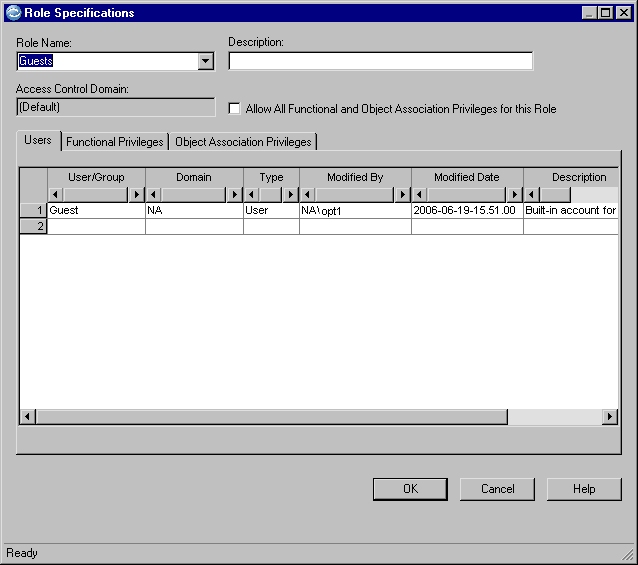
Role Name
The role name (up to 30 characters). To create a new role for the ACD, type the name or select from a history list of role name entries.
- You cannot use the Role Name history list to navigate from role to role in the ACD. You must open each role from the Access Control Domain Editor.
- It is possible to assign identical names to roles made up of different user accounts, if the roles are in different ACDs. For simplicity, a consistent naming convention that prevents duplicate role names may be advisable. However, duplicate role names may be useful if you wish to use the Optim Object Template ACL with more than one ACD. In this case, the Template ACL would assign access permissions to a standard set of roles with the role members varying by ACD.
You can use a role that is displayed in the Role Specifications dialog as a model to create a new role or replace another role in the ACD by typing or selecting a Role Name from the history list.
Description
Optional text that describes the role (up to 40 characters).
Access Control Domain
The ACD for the role.
Allow All Privileges for this Role
Select the Allow All Functional and Object Association Privileges check box to allow the role all Functional (if editing the (Default) ACD) and Object Association Privileges. When this check box is selected, the Allow All and Allow check boxes are selected and cannot be cleared. Also, the Allow All, Deny All, and Clear All command buttons and the shortcut menus are unavailable. When the check box is cleared, the Allow All and Allow check boxes remain selected but can be cleared.
Tabs
The Role Specifications dialog includes the following tabs:
- Users
- The user and group accounts in the role.
- Functional Privileges
- Access privileges to functions for accounts in the
role. Note: The Functional Privileges tab is available only from the (Default) ACD.
- Object Association Privileges
- Permissions to use the ACD to secure Optim objects for accounts in the role.