Report Tab
Use the Report tab to set formatting defaults for the Report Process.
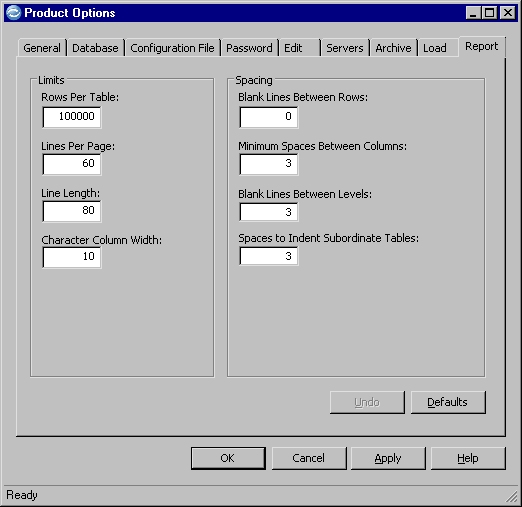
Limits
Set default limits for the output of the Report Process.
- Rows per Table
- Specify the maximum number of rows (1 to 99999999) that can be reported on during a single Report Process.
- Lines per Page
- Specify the maximum number of lines per page (1 to 999) for the report.
- Line Length
- Specify the maximum number of characters per line (1 to 999) for the report.
- Character Column Width
- Specify the maximum number of characters per column (1 to 999) for the report.
Spacing
Set default spacing preferences for the output of the Report Process.
- Blank Lines Between Rows
- Specify the number of blank lines to insert between each row in the report.
- Minimum Spaces Between Columns
- Specify the number of blank spaces to insert between each column in the report.
- Blank Lines Between Levels
- Specify the number of blank lines to insert between each level of related tables, when Show Joins is enabled, and related tables are joined. (Archive File Report only)
- Spaces to Indent Subordinate Tables
- Specify the number of blank spaces to indent rows from each subordinate joined table in the report. (Archive File Report only)