What's new and changed in watsonx.governance
watsonx.governance updates can include new features and fixes. Releases are listed in reverse chronological order so that the latest release is at the beginning of the topic.
You can see a list of the new features for the platform and all of the services at What's new in IBM Software Hub.
IBM watsonx™ Version 2.2.2
A new version of watsonx.governance was released in October 2025.
This release includes the following changes:
- New features
-
This release of watsonx.governance includes the following features:
- New query parameter for flagging historical records in the Datasets API and Python SDK
-
You can now use the
is_historical_dataquery parameter to identify records as historical when uploading data through the Datasets API or Python SDK.When you upload records using the
POST /v2/data_sets/{data_set_id}/recordsREST endpoint or thestore_recordsmethod in the Python SDK, setis_historical_data=trueif your records include values in thescoring_timestamporrecord_timestampfields and are intended for historical evaluation. If you omit the parameter or set it tofalse, the records are used in current evaluations, even if the timestamps are in the past.This enhancement improves clarity and control when managing timestamped data for model evaluation workflows.
- Enhancements to Governance Console
-
- Create child object from generative AI output
-
Users can now generate child objects, such as action items or controls, based on generative AI output. This feature streamlines content creation and helps users act on AI-generated insights more efficiently.
For more information, see Configuring model outputs in the IBM OpenPages documentation.
- Customize task views with compact, editable table layouts
-
You can now use a compact layout option to organize fields in a table format within task views. Related information is easier to read and interact with, especially when you use multiple fields. You can define column and row headers, and fields remain editable based on access controls. The following figure is an example of a table layout for Budget and Schedule fields:
Figure 1. Compact table layout for Budget and Schedule fields 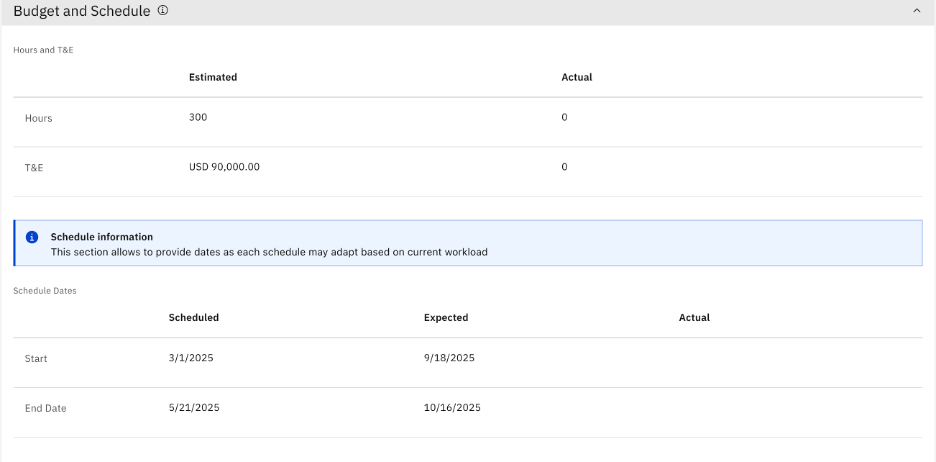
- View grid data as cards for better readability
-
Users can now switch between grid and card layouts for data presentation. The card layout is especially useful on smaller screens and enhances readability for more consumable data. Admins can configure default and allowed layouts.
Figure 2. Card layout in a grid view 
For more information, see Defining default layouts on Grid Views and Using Grid Views to find, open, and work with objects in the IBM OpenPages documentation.
- Run calculations on selected objects from a grid view
-
Admins can now select specific objects from a grid view and run calculations on them. You save time and resources when you run targeted calculations.
- Configure multiple relationships in object creation workflows
-
You can now configure multiple relationships in the workflow operations for creating objects. This enhancement simplifies complex object creation scenarios and improves data linkage.
For more information, see Defining a workflow action that creates objects in the IBM OpenPages documentation.
For more information about new features and other updates in Governance console, see New features in version 9.1.2 in the OpenPages documentation.
- Customer-reported issues fixed in this release
- For a list of customer-reported issues that were fixed in this release, see the Fix List for IBM Cloud Pak® for Data on the IBM Support website.
IBM watsonx Version 2.2.1
A new version of watsonx.governance was released in August 2025.
This release includes the following changes:
- New features
-
This release of watsonx.governance includes the following features:
- Create detached prompts in the UI
-
You can now create detached prompts directly in the user interface in both projects and deployment spaces. Previously, you could create detached prompts only by using notebooks. This enhancement simplifies detached prompt creation and improves accessibility for users.
- Govern AI agents and tools
-
You can now find, add, and compare AI tools and agents in the governed agentic catalog. You can find tools that are provided by IBM, add endpoints for agents and tools that you deployed elsewhere, or add code for your custom agents and tools. You load and invoke agents and tools from the catalog in your solution by using the watsonx.governance Python SDK.
For more information, see Governed agentic catalog.
- Evaluate agentic applications in Evaluation Studio
-
In the Evaluation Studio, you can now create an AI evaluation asset for AI experiment runs of an agentic AI application. You can then compare the results of the evaluations to identify the version of the application that performs best according to key criteria.
For more information, see Evaluation Studio for Agentic AI applications.
- Govern Python functions to ensure transparency, traceability, and compliance for custom logic that is used in production workflows
-
You can now govern Python functions so that you can apply the same governance policies and metadata tracking to Python functions as you apply to models, datasets, and notebooks. This ensures transparency, traceability, and compliance for custom logic that is used in production workflows.
- You can now include Python functions in use cases, along with models and datasets, to provide context around which business problems they serve.
- You can include Python functions under different use case approaches—for example major or minor versions for evolving preprocessing logic.
- When tracked in a use case, the metadata of the Python function (such as owner, inputs and outputs, creation date, and associated compliance requirements) is captured.
- Add user groups as collaborators on AI assets
-
When you add collaborators to an asset that is in an inventory, you can now select user groups as well as users. You can also assign roles to the users and groups.
For more information, see Adding collaborators to an AI use case.
This release also includes the following enhancements to Governance console:- Format simple and long string display types in Markdown
-
You can now use Markdown as a Display Type for simple and long string data types. The display type allows you to both edit and preview your Markdown code before saving, making it easy for AI integration because Markdown is the main format for AI model output.
For information, see Data types in the OpenPages documentation.
- Navigate quickly to referenced fields in the comments within a task view
-
Streamline collaboration and reduce search time by referencing fields in comments by using a # sign that enables recipients to navigate directly to the referenced field within the task view.
- Automatically trigger AI models from workflows
-
Workflow actions can now directly trigger auto actions on Set fields and Set tags custom machine learning models. This automated triggering streamlines automation tasks such as automatically categorizing issues.
- Export questionnaire assessment responses to a Microsoft Excel spreadsheet
-
Get an overview of Questionnaire Assessment responses by exporting them to an Excel spreadsheet file in any stage of the assessment.
For information, see Exporting questionnaire assessments and questionnaire templates in the OpenPages documentation.
- Move or rename business entities directly through the UI
-
Improve operational efficiency by batch moving and renaming business entities directly through the UI in the Administration menu.
- Automatically set relationships leveraging AI models
-
Automate the setting of relationships in grids by using custom machine learning models that run automatically on input changes. Users can simply review and update related objects or activities.
For information, see Configuring model inputs in the OpenPages documentation.
For more information about these new features and other updates in Governance console, see New features in version 9.1.1 in the OpenPages documentation.
- Updates
- The following updates were introduced in this release:
- Customer-reported issues fixed in this release
- For a list of customer-reported issues that were fixed in this release, see the Fix List for IBM Cloud Pak for Data on the IBM Support website.
IBM watsonx Version 2.2.0
A new version of watsonx.governance was released in June 2025.
This release includes the following changes:
- New features
-
This release of watsonx.governance includes the following features:
- Compliance Accelerators for AI risk management
-
You can now subscribe to the Compliance Accelerators add-on to gain access to Policy Packs from Credo AI. The Policy Packs are a set of specialized, easy-to-use content bundles that provide clear, actionable insights aligned with global regulations and AI standards, including the EU AI Act, ISO/IEC 42001, and the NIST AI Risk Management Framework.
- Default inventory replaces Platform assets catalog
-
Now you can use a default inventory to store artifacts including AI use cases, third-party models, attachments, and reports. The default inventory replaces any previous dependency on the Platform assets catalog or IBM® Knowledge Catalog for storing governance artifacts.
- Multilingual Metrics Support in Generative AI Quality Monitor
-
You can now evaluate Generative AI outputs in multiple languages by using the Generative AI Quality monitor inwatsonx.governance. With this new feature, you can create both design-time and runtime evaluations using certain selected metrics for summarization, generation, extraction, question answering (QA), and retrieval-augmented generation (RAG) tasks. The languages include: English (en), Japanese (ja), German (de), French (fr), Spanish (es), Arabic (ar), Italian (it), Portuguese (pt), Korean (ko), and Danish (DA). For more information, see Evaluating generative AI output in multiple languages.
- Extended Character Limit Support in Prompt Template Assets
-
You can now work with significantly larger text data in Prompt Template Assets (PTAs) by using a new column configuration option in the UI to increase the character limit value to more than 32k (excluding meta fields and label column in classification task type). This enhancement is ideal for use cases like large context for RAG, long-form summarization, transcript processing, and other large text scenarios in Generative AI workflow. For more information, see Evaluating prompt templates in projects and Evaluating prompt templates in spaces.
- Drift v2 Batch Subscriptions support
-
You can now configure Drift v2 evaluations for batch subscriptions across all supported databases in IBM Cloud Pak for Data. This enhancement enables you to monitor model performance over time, ensuring consistent outcomes and data integrity in batch processing environments.
- Evaluate global custom foundation models
-
You can now evaluate custom foundation models that are registered globally. With this enhancement, you can monitor and manage globally registered custom models that are accessed across multiple projects and deployment spaces. Inference operations use the Global Model ID, to ensure consistent model usage and streamlined governance across your enterprise environments.
This release also includes the following enhancements to Governance console:- Integrating with Amazon SageMaker
-
You can now use the Governance console capabilities for Amazon SageMaker models. With this integration, you can bring the advanced AI governance capabilities of the Model Risk Governance solution to your Amazon SageMaker predictive machine learning and generative AI models.
For more information, see
Integrating with Amazon SageMaker
in the OpenPages documentation. - Using views to send input fields to custom models
-
In previous versions of the Governance console, an administrator could specify object fields to use as input to a custom model. Administrators can now configure a Task or Report View as input to the custom model. Except for chart relationship fields, all object fields and relationship fields in the view are sent as input to the model. Users can access the insights from a model from the View AI insights button that the administrators can add to a view in View Designer.
For more information, see Configuring model inputs in the OpenPages documentation.
- Exporting data
-
You can export data from the Governance console to be used outside of the Governance console in dashboarding and reporting applications, for retrieval-augmented generation (RAG), and for other AI-based models. You must have the Data Export permission to run data exports.
For more information, see Exporting OpenPages data to be used by other applications in the OpenPages documentation.
- Nested grids
-
An administrator can set up a nested grid for a Grid View or as a relationship field in a Task or Admin View. A nested grid displays the children of a specified object type and descendants of specified object types for each child. Each level of objects is indented to provide a visual representation of the relationships between the objects.
For more information, see the following topics in the OpenPages documentation: Defining a grid view and Adding a grid layout.
- Arabic (Saudi Arabia) and Arabic (United Arab Emirates) locales are available
-
Administrators can now add Arabic (Saudi Arabia) and Arabic (United Arab Emirates) as new locales. However, all numeric data such as currency, decimals, and time, use Western Arabic numerals, regardless of the regional preference.
For more information, see Adding locales in the OpenPages documentation.
For more information about these new features and other updates in Governance console, see New features in version 9.1.0 in the OpenPages documentation.