EDI Translation Object Browser
EDI Translation Object browser allows you to view, print, delete, and register translation objects.
The following illustrates the EDI Translation Object browser.
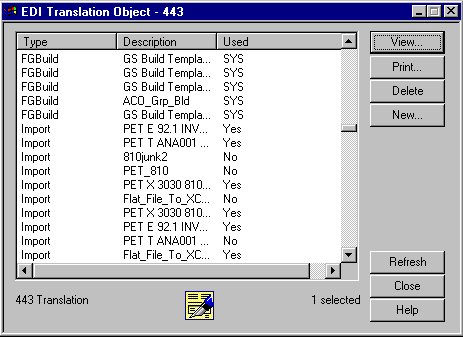
The following lists the parts of the EDI Translation Object browser and their functions.
| Part | Function |
|---|---|
| Type | Describes the type of translation object defined, such as export, import, or system import. |
| Description | Displays a description that further identifies the translation object. |
| Used | Indicates whether the translation object is currently
associated with an Inbound or Outbound Partner Relationship. Valid
values are:
Note: If a translation object is currently used (associated with
an Inbound or Outbound Partner Relationship), you cannot delete it.
Also, the system prevents you from deleting translation objects that
are designated as system translation objects (SYS* or SYS).
System Translation Objects are all translation objects except Import, Export, Data Entry, Screen Entry, Turn Around, and Print. Also, any translation object with “system” in the description is a system translation object. |
| View | Displays a window containing descriptive information
for the selected translation object, including the following:
|
| Displays the Print Choice dialog box, which allows
you to specify whether you want to print the selected translation
objects or print a summary list of the selected translation objects. Note: The
Formatted option is unavailable because a formatted version is always
printed for a translation object.
|